
Blend View 3D3.8 - Google Play
You'll be able to see results in few seconds.
Publisher Description
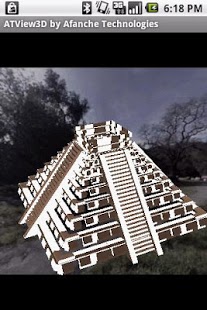
This is a great 3D Blender file (.blend format) viewer. Blender is the most popular free open source 3D graphics software used for creating animated films, visual effects, interactive 3D applications, video games or other 3D content. It is widely used by 3D artist and modeler all over the world. With help of this app, you can take your 3D Blend files with you no matter where you are and view them with your phone (or tablet) directly.
The app provides many 3D features including rotating model with finger movement, zooming in/out, changing object material color, changing rendering light intensity, etc. You can rotate 3D model in any direction, or only along x, y or z axis. You can load multiple files, view them together. You can view model in 3D rendering or wireframe mode. You can also use it to find out information about your files, for instance, the file size, the height, width and depth of your model, total surface area, total length, etc.
The app supports rendering 3D objects on top of different background, for instance, you can change background color, make it transparent or use an image. You can choose any image you want to be the background image. For instance, you can use environment picture, or just simply your company's logo.
The app provides you snapshot feature so that you can take a screenshot of your 3D model, and draw your remark on it and send it to your coworkers through email for reviewing and collaborating purpose.
3D data files can be added to your device's external storage folder called 'afanche'. Just connect your phone (or tablet) to a PC and copy 3D models to the 'afanche' folder of the device. After that, you can use the app to load the models. If you have files in any other folder of your device, you can use the app to find and open them as well. You can use the app to open files from email(attachment) or web (by downloading). The app also supports third party file management app, for instance, DropBox, Box, etc. Note,
The app is not just a 3D data file viewer. It is also a file organizer. The app provides file sorting feature to help you find your model quickly. You can sort by file name or file creation time. If you need share 3D model, you can use in-app email feature to send your model out as email attachment. You can use the app to create folder, move files between folders or delete folders or files. The app also provides you zip/unzip function, therefore, you can save all your project files into a single zip file.
Please make sure you use the Menu button of your device. Many features of the app are only visible after you press Menu button.
The app provides native support for multimedia including image, video and audio. This way, you can manage picture or video of your project and 3D files together. The app provides features for you to have a peek at the raw data of files in ASCII (text) or binary format.
The app is powerful and super easy to use. It is fast and capable of loading huge models. ATView3D 3D visualization apps are widely used by professionals all over the world.
The app is part of ATView3D 3D visualization tool family developed by Afanche Technologies. If you need Android, iPhone, iPad, Windows app for other 3D file formats, please search 'Afanche' or 'ATView3D' to find more 3D apps. Afanche Technologies is a company specialized in 3D technologies.For more info, please visit our website http://www.afanche.com.
About Blend View 3D
The company that develops Blend View 3D is Afanche Technologies. The latest version released by its developer is 3.8.
To install Blend View 3D on your Android device, just click the green Continue To App button above to start the installation process. The app is listed on our website since 2012-06-29 and was downloaded 0 times. We have already checked if the download link is safe, however for your own protection we recommend that you scan the downloaded app with your antivirus. Your antivirus may detect the Blend View 3D as malware as malware if the download link to com.afanche.android.ATViewBlend is broken.
How to install Blend View 3D on your Android device:
- Click on the Continue To App button on our website. This will redirect you to Google Play.
- Once the Blend View 3D is shown in the Google Play listing of your Android device, you can start its download and installation. Tap on the Install button located below the search bar and to the right of the app icon.
- A pop-up window with the permissions required by Blend View 3D will be shown. Click on Accept to continue the process.
- Blend View 3D will be downloaded onto your device, displaying a progress. Once the download completes, the installation will start and you'll get a notification after the installation is finished.
Program Details
System requirements
Download information
Pricing
Version History
version 3.8
posted on 2012-06-29
Several fixes and updates
version 3.8
posted on 2012-06-29
Disclaimer
Official Google Play Link
We do not host Blend View 3D on our servers. We did not scan it for viruses, adware, spyware or other type of malware. This app is hosted by Google and passed their terms and conditions to be listed there. We recommend caution when installing it.
The Google Play link for Blend View 3D is provided to you by apps112.com without any warranties, representations or guarantees of any kind, so access it at your own risk.
If you have questions regarding this particular app contact the publisher directly. For questions about the functionalities of apps112.com contact us.
